





FAQs
Humidifiers
General Humidifier FAQs
Filter Free Humidifiers
General Support
Vicks CoolRelief Cool Mist Humidifier (VUL600)
Vicks 3-in-1 SleepyTime Humidifier (VUL500)
Vicks Mini Filter Free Cool Mist Humidifier (VUL520)
Vicks Filter Free Cool Mist Humidifier (V4600)
Vicks Mini Filter Free & Filter Free Humidifier (VUL525 & VUL545)
Vicks Dual Comfort Cool + Warm Mist Humidifier (VWC775)
Vicks Warm Mist Humidifier (V750)
Filtered Humidifiers
General
Vicks Warm Mist Humidifier (VWM845)
Vaporizers
General
Vicks Warm Steam Vaporizer (V150)
Steam Inhalers
Vicks Plug-in Sinus Inhaler (VIH200)
Vicks Cord Free Sinus Inhaler (VIH350)
VapoPads™ & VapoSteam™
Vicks VapoSteam™ (VIN008)
Vicks VapoPads®
Thermometers
General
Vicks SpeedRead Digital Thermometer with Fever InSight (V912)
Vicks ComfortFlex Thermometer With Fever InSight (V966)
Vicks No-Touch 3-In-1 Thermometer (VNT200)
Vicks Non Contact Infrared Body Thermometer (VNT275)
Vicks SmartTemp Thermometer (VDT985US) and SmartTemp App FAQs
Frequently Asked Questions
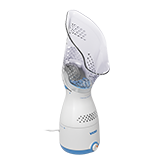
Cord Free Sinus Inhaler FAQs
Question: My Cord Free Sinus Inhaler will not power on, what should I do?
Answer: If the inhaler isn’t powering on, fully charge the inhaler by plugging the adapter into a power outlet and connecting the inhaler using the charging port. Remember, the inhaler will not work while it is plugged in and charging.
Question: How do I descale my Cord Free Sinus Inhaler?
Answer: A red light will alert you when it is recommended to descale the heat plate. Don’t worry! Descaling is perfectly normal. By descaling your cord free sinus inhaler, you are removing any mineral build up that may accumulate from the tap water used. This is a normal part of the routine for this unit.
First, please make sure the Cord Free Sinus Inhaler is completely cooled down and has been off for at least twenty minutes.
To Descale:
- Remove the mask and unscrew the heat plate cap to expose the heat plate.
- Next, carefully pour ½ teaspoon of distilled white vinegar into the heat plate basin and let sit for 10 minutes. Then use a soft cloth to carefully brush any scale off the heat plate.
- Empty the distilled white vinegar and wipe heat plate basin with a clean damp cloth. Use caution to not let water get into any electrical areas, vents or seams.
- Dry the heat plate basin and inhaler with a clean cloth or paper towel.
- At the time of descaling, it is recommended to also wash the inhaler mask with mild soap and warm water. Make sure the mask is completely dry before replacing on the inhaler.
- If needed, clean VapoPad slots by wiping them with a clean, dry cotton swab
- Once descaling and cleaning are complete, the red descale warning light can be reset by holding down the power button for 4 seconds.
Question: How do I know when I should descale my Cord Free Sinus Inhaler?
Answer: If your Inhaler is producing steam slower or at a less powerful rate than normal, it may be time to descale your inhaler. Additionally, if you live in an area prone to hard water, it may make sense to descale on a regular basis depending on often you use the Cord Free Sinus Inhaler.
Question: What should I do if my Cord Free Sinus Inhaler isn’t Producing Steam?
Answer: Please check the following:
- Make sure the water tank is filled to the recommended level.
- Confirm the battery is fully charged.
- Remove mask and verify the heat plate cap is screwed on tightly before replacing the mask onto the main housing.
- Ensure the face mask is securely attached.
If all of these are properly set, the inhaler should operate normally.
Question: My Cord Free Sinus Inhaler will not power on there is a blinking teal light around the power button. What does this mean?
Answer: If the power button blinks teal and the inhaler does not turn on, the inhaler is in sleep/travel mode. You can remove the inhaler from sleep mode by simultaneously holding the power button and pressing the minus button twice in quick succession, OR by plugging the adapter into the inhaler. After the inhaler is unlocked it should work normally.
Question: My cordless sinus inhaler is plugged in to charge, but the power light is not blinking green and it does not appear to be charging. What should I do?
Answer: Please check the following:
- Make sure you are using the adapter that originally came with your inhaler. Other adapters are not compatible and should not be used.
- If the proper adapter is being used and the unit is still not charging, double check that the adapter and charging cord are fully inserted.
- Check that the outlet is working properly by plugging another device into it or try plugging the inhaler into a different outlet.
- If the inhaler still doesn’t charge, the battery may be past its useful life and the inhaler will need to be replaced.
If you still experience issues with your Cord Free Sinus Inhaler after troubleshooting these FAQs please feel free to reach out to us at: You can reach our team during business hours at 1-800-VAPOR-1-2
FAQs
Humidifiers
General Humidifier FAQs
Filter Free Humidifiers
General Support
Vicks CoolRelief Cool Mist Humidifier (VUL600)
Vicks 3-in-1 SleepyTime Humidifier (VUL500)
Vicks Mini Filter Free Cool Mist Humidifier (VUL520)
Vicks Filter Free Cool Mist Humidifier (V4600)
Vicks Mini Filter Free & Filter Free Humidifier (VUL525 & VUL545)
Vicks Dual Comfort Cool + Warm Mist Humidifier (VWC775)
Vicks Warm Mist Humidifier (V750)
Filtered Humidifiers
General
Vicks Warm Mist Humidifier (VWM845)
Vaporizers
General
Vicks Warm Steam Vaporizer (V150)
Steam Inhalers
Vicks Plug-in Sinus Inhaler (VIH200)
Vicks Cord Free Sinus Inhaler (VIH350)
VapoPads™ & VapoSteam™
Vicks VapoSteam™ (VIN008)
Vicks VapoPads®
Thermometers
General
Vicks SpeedRead Digital Thermometer with Fever InSight (V912)
Vicks ComfortFlex Thermometer With Fever InSight (V966)
Vicks No-Touch 3-In-1 Thermometer (VNT200)
Vicks Non Contact Infrared Body Thermometer (VNT275)
Vicks SmartTemp Thermometer (VDT985US) and SmartTemp App FAQs
Need further assistance?

Call Us
(800) 477 - 0457
Monday - Friday
9:00 am- 5:00 pm EST

Email Us
Email your questions to:
[email protected]

Vicks Support Channel
Your questions answered for all Vicks products